
Listing courses on a resume should make you look clearer, not louder.
Your goal is simple: help a busy reviewer trust what you can do, without inflating anything.
List Courses on Resume Without Looking Like You Are “Padding”
Most resumes fail here for one reason.
They list learning the way people list hobbies, with no context and no proof.
A hiring manager does not need to see everything you ever watched.
They need to see what is relevant to the job, what is completed, and what you can apply.
If you keep those three points visible, courses become an asset instead of a red flag.
What counts as a “learning credential”
A learning credential can be a university course, a MOOC, a bootcamp module, or a professional training program.
It can also be a certificate of completion or an exam-based certification.
These are not the same thing, and your resume should not pretend they are.
Clarity is the entire strategy.
The quickest rule that prevents awkward interviews
Never list something in a way that would make you uncomfortable if asked about it directly.
If you would need to explain it with excuses, rewrite it before you publish it.
When your wording is honest, your confidence becomes noticeable.
When to List Courses on Resume and When to Leave Them Out
Courses help most when they reduce doubt about your fit.
Courses hurt when they distract from stronger proof, like experience or projects.
So you need a filter.
A simple relevance filter you can use in 60 seconds
Ask one question first.
Would this course make sense to the person hiring for this exact role.
If the answer is “not really,” do not list it.
If the answer is “yes,” keep going.
Use this three-part test before you include any course
- Relevance: The course teaches skills mentioned in the job description you are targeting.
- Recency: The learning is recent enough that you can still perform it confidently.
- Readiness: You can prove application through a project, work sample, or concrete output.
If you pass two out of three, the course is usually worth a line.
If you pass only one, it is probably noise.
The “resume real estate” rule
Your resume is not a transcript.
Every line you add must earn its place by increasing your chance of an interview.
If a course does not do that, it belongs in your personal notes, not in your application.
Resume Formatting Options for Courses and Credentials
Where you list courses changes how they are interpreted.
Placement is part of the message.
Choose the location that matches the strength of the signal.
Option 1: Put courses in Education when they are academic and job-relevant
This is best when the course is part of a degree, a university program, or a recognized academic track.
It also works when the role strongly values formal learning, like education positions.
Keep it selective, because long course lists read like filler.
Option 2: Use a Certifications section for exam-based credentials
This is the best home for credentials that required passing an exam or meeting a standard.
It also makes verification easier when the credential has an ID or URL.
Do not mix “completed a course” with “earned a certification” in the same line.
Option 3: Use Professional Development for short programs and MOOCs
This section is a clean way to show structured learning without implying formal accreditation.
It is also a safe place to list MOOCs, workshops, and training programs.
If you are pivoting careers, this section can bridge your story.
Option 4: Integrate learning into Experience bullets when it led to results
This is the most powerful format when you can tie learning to outcomes.
It reads like capability, not like consumption.
It also prevents the “I watched content” vibe.
List Courses on Resume With Wording That Feels Transparent
Honest wording is not boring.
Honest wording is persuasive because it reduces doubt.
Your resume should sound like a professional who is comfortable telling the truth.
Use the provider name and the exact credential name
Copy the official course title as it appears on the provider page.
Do not rename it to sound more impressive.
If the provider calls it a “certificate of completion,” keep that phrasing.
Show status clearly without drama
Completed means completed.
In progress means you are actively working and can name a realistic target date.
Planned means it does not belong on a resume.
Use dates that support trust
Add a year or month and year if the learning is recent and relevant.
If the course is older, only include it if you still use the skill and can prove it.
Old learning with no current proof creates suspicion.
Be careful with the word “certified”
“Certified” implies you earned a certification, not that you completed a course.
If you completed training, say “completed” or “certificate of completion.”
This one word choice can protect your credibility instantly.
Formatting Examples You Can Copy and Paste
The best resume formatting is easy for humans and easy for ATS systems.
That means clean text, consistent structure, and no confusing labels.
Below are examples that keep you honest and still look strong.
Example 1: Certifications section for exam-based credentials
Certifications
- Credential Name (Issuer), Month Year
  Credential ID: XXXXX (optional)
This format is simple, readable, and verification-friendly.
It also avoids mixing training with testing.
Example 2: Professional Development section for MOOCs and short programs
Professional Development
- Course Name (Provider), Month Year, Certificate of Completion
- Course Name (Provider), In progress, Target: Month Year
Notice how the status is explicit and calm.
That tone signals integrity.
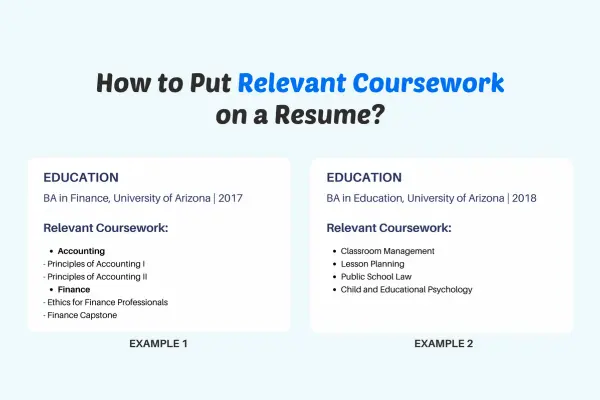
Example 3: Education section with selected relevant coursework
Education
Bachelor of ________ (University), Year
Selected Coursework: Course A, Course B, Course C
Selected coursework should stay selected.
Three to six items is usually enough to show direction.
Example 4: Experience bullet that ties learning to results
Experience
- Built ________ by applying ________ methods learned in ________ training, improving ________ as measured by ________.
This is the highest-trust version because it connects learning to action.
It also makes your resume feel less junior.
Do and Don’t: List Courses on Resume Ethically
This is where most people accidentally damage their own chances.
The good news is that small edits fix it fast.
Do this if you want to look credible
- Choose courses that match the job description skills, not your personal curiosity list.
- State completion status clearly and use a realistic target date for anything in progress.
- Add one proof link when possible, like a portfolio case study or project artifact.
- Use consistent formatting across entries so your resume feels organized.
- Keep the section short so it reads like focus, not like a shopping cart.
Avoid this if you want to avoid skepticism
- Do not list ten beginner courses instead of one strong project, because it looks like avoidance.
- Do not rename a course to sound like a degree, because it creates trust debt.
- Do not use “certified” unless you truly earned a certification through assessment.
- Do not list “ongoing” with no end date, because it reads like you never finish.
- Do not add badges that are unrelated to the job, because they dilute your story.
Common inflation traps and safer replacements
If you wrote “Expert in ________,” replace it with “Completed ________ and applied it by building ________.”
If you wrote “Certified in ________” for a course, replace it with “Certificate of completion in ________.”
If you wrote “Advanced training” without details, replace it with the exact course name and provider.
Precision is persuasive.
A Credibility Checklist Before You Submit Your Resume
Use this checklist like a final quality review.
It helps you keep your resume honest and strong at the same time.
Credibility checklist
- Each listed course supports a specific job I am applying to right now.
- Every course has a clear status, and I can explain what I learned without scrambling.
- The wording does not imply accreditation, licensing, or endorsement that does not exist.
- I used “certification” only for credentials that required passing an assessment or meeting a standard.
- I can point to proof for the most important skills, even if the proof is a small project.
- The section is short enough that it feels curated.
- The formatting is consistent and ATS-friendly.
If you can confidently check these boxes, you are in a good place.
If you cannot, the fix is usually editing, not more content.
How to Decide What Not to List
Leaving things out is not hiding.
Leaving things out is strategy.
Clutter forces the reader to do extra work, and extra work kills interest.
Courses to leave off most resumes
- Introductory courses that do not connect to the role you want.
- Courses you completed years ago and cannot apply confidently today.
- Courses with no assignments or outputs, when the role expects practical proof.
- Courses you started but did not finish, unless you are actively completing them now.
Your resume is not the place to confess every experiment.
Your resume is the place to show direction and readiness.
LinkedIn Education, Courses, and Credentials: Where Each One Belongs
LinkedIn has multiple places to list learning, and each sends a different signal.
Use the right section and you will look transparent and intentional.
Licenses and Certifications section
Use this for true certifications and formal credentials with verification details.
Add the issuing organization and the date.
Include a credential ID or verification link only if it is legitimate and available.
Education section
Use this for degrees, formal programs, and academic institutions.
Avoid stuffing it with MOOCs, because it can look like you are trying to “upgrade” what it is.
Keep the Education section clean and accurate.
Courses section
This is a fine place for individual courses, especially if they support your pivot story.
Do not rely on this alone, because many recruiters never scroll deep enough to notice.
If a course matters, also show proof through Featured or Experience.
Featured section
This is where your proof should live.
Feature a case study, a project artifact, a lesson plan sample, or a portfolio page.
Let the credential support the proof, not replace it.
LinkedIn Text Examples That Sound Human and Honest
Posting a credential can feel awkward, especially if you want to avoid bragging.
These templates keep it professional and grounded.
Template 1: Completion with application
I completed ________ to strengthen my skills in ________.
I applied it by building ________, focused on ________ outcomes.
If you work in ________, I would love one piece of feedback on how to improve it.
Template 2: In progress with a real milestone
I am currently completing ________ with a target finish date of ________.
This week I built ________ as a practical output from the course.
Next week I plan to improve ________ based on ________ criteria.
Template 3: Quiet update for your About section
I am focused on building skills in ________ through structured learning and hands-on projects.
Recent training includes ________ and ________.
I prioritize transparent credentials and publish proof through case studies and work samples.
Resume Formatting Tips for ATS and Real Humans
You can have the best content and still lose if the formatting is messy.
ATS systems prefer simple structures, and humans do too.
Keep it clean and consistent
Use one section title consistently, like “Professional Development” or “Certifications.”
Use the same order for every entry, like course name, provider, date, and status.
Consistency makes you look organized, which is a quiet but powerful signal.
Use keywords naturally, not as a pile
If a job description says “curriculum design,” do not paste that phrase everywhere.
Use it once where it fits and support it with an outcome or artifact.
Proof beats repetition every time.
Link to evidence the smart way
If you include links, make them simple and professional.
A portfolio homepage link is often better than a messy deep link.
If the role is education-focused, a single case study can do more than multiple course lines.
A Practical 30-Minute Plan to Clean Up Your Learning Section
This is for professionals who want improvement today, not “someday.”
- Pick one target role and open two job descriptions.
- Highlight five skills that appear in both postings.
- Keep only the courses that support those skills directly.
- Rewrite each entry to include provider, status, and date.
- Add one proof link if you have it, and if you do not, schedule a small project to create it.
This takes less time than most people spend debating fonts.
It also produces a resume that feels honest and focused.
Independent Content Notice
Notice: this content is independent and does not have affiliation, sponsorship, or control by any entities mentioned.
Any platforms, institutions, tools, or third parties referenced are examples only, and you are responsible for your choices and usage.
Final Take: Honest Credentials Win Long-Term
If you list learning credentials clearly and honestly, you reduce doubt.
If you pair learning with proof, you become easier to hire.
If you keep the section curated, you look focused instead of frantic.
That is how courses raise your value without inflating anything.